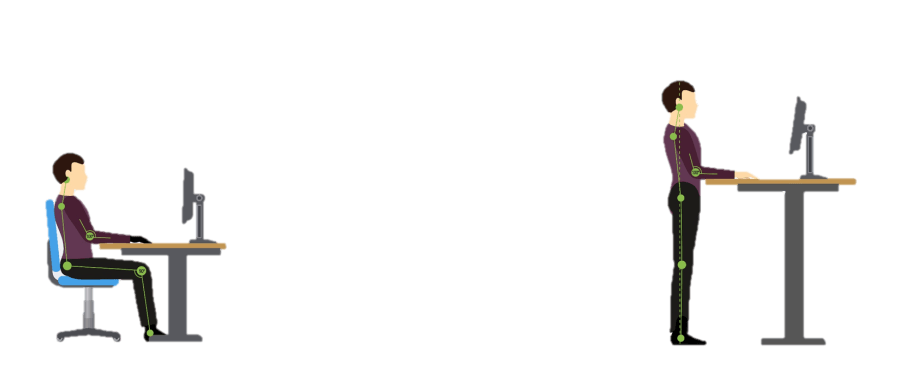
On average, Flemings sit for more than 8 hours a day. This prolonged sitting carries a number of health risks.
As an employer, you can apply several strategies to encourage 'less sitting' and thus increase the well-being of your employees. A sit-stand desk, for example, can offer a solution.
Please note: it is important to first analyse which adjustments are necessary to enable the employee to work ergonomically and without complaints. A sit-stand desk can offer a solution, but complaints can also be triggered by (an incorrect setting of) the office chair, the desk, the screens, the keyboard, and so on. It is important to examine these matters first. Premed can help you conduct a risk assessment and/or optimize individual workstation setups.
Pros and cons of sit-stand desks
PRO
- With a sit-stand desk, you can easily alternate between sitting and standing, so you spend less time working sitting and change posture more often. This has a positive impact on your general health and mental well-being.
- Because you regularly change posture when using a sit-stand desk, you can concentrate better and work more productively.
- A sit-stand desk can also be easily adjusted to a correct height in a sitting position, allowing for an ergonomic working posture (this is also possible with a height-adjustable 'sitting' desk, although these are often slightly less practical to adjust).
CONS
- Working standing for long periods in the same place can also cause complaints, including lower back pain, leg cramps, and leg fatigue.
It is not recommended to work standing for more than 1 hour at a time and more than 4 hours per day. The most important thing is not to stand for a long time, but to change posture regularly. It is recommended to alternate regularly between sitting and standing. For example, stand for 15-20 minutes after an hour of sitting.
- Behavioral change is needed to regularly interrupt sitting work with standing work.
- It is an investment.
Points of attention
- It is advisable that users of a sit-stand desk receive instructions and training on how to set a correct desk height (both sitting and standing) so that they can correctly adjust their desk in both positions and adopt an ergonomic working posture. A poor adjustment of a sit-stand desk can (just like with a too high or too low 'sitting' desk) cause physical complaints.
- Even when using a sit-stand desk, a correct adjustment of the office chair (in a sitting position), the screens, the keyboard, and so on, is important.
- It is essential to make employees aware and motivate them to actually alternate between a sitting and standing working posture. Research shows that a behavioral change does not simply occur by placing a sit-stand desk. The first step is to make employees aware of the risks of prolonged sitting. In a next step, support from the organisation is needed by organizing training courses on this topic and creating a policy that includes, for example, "mandatory standing periods" or sets individual goals so that a lasting behavioral change can occur.
- Optionally, a 'reminder' can be set (via an app, watch, or computer program) so that one does not forget to alternate between sitting and standing. This can also be managed by the organisation.
Important considerations when purchasing
If you proceed with the purchase of a sit-stand desk, it is best to take the following aspects into account:
- Choose a matte, non-reflective desktop in a light colour (not too light, not too dark).
- Choose a table with a durable 'lift system' that makes as little noise as possible when adjusting (so as not to disturb colleagues).
- A sit-stand desk must be sufficiently height-adjustable so that employees, from small to tall, can set the desk at a correct height. Based on anthropometric data of the Belgian population, a sit-stand table should be adjustable from 61 to 127 cm. EN 527 (European standard) prescribes an adjustability of 65-125 cm, the Dutch practical guideline (NPR) 1813 recommends an adjustability of 65-130 cm.
|
Recommendations |
EN 527 |
NPR 1813 |
|
Height sit-stand desk |
65-125 cm |
65-130 cm |
|
Minimum desk depth |
80 cm |
80 cm |
|
Minimum desk width |
120 cm |
120 cm (straight part of 65 cm) |
|
Desktop colour/material |
/ |
light and matte, not white |
|
Tabletop thickness |
Max 5.5 cm at employee's side (at 50 cm depth, max. 8 cm) |
5 cm |
- The desk must be large enough to place a screen, keyboard, mouse, and other accessories on it. The European standard (EN) and Dutch practical guideline (NPR) (see table) can provide an indication regarding dimensions. The minimum width of a desk is 120 cm, 160 cm is recommended. These dimensions are a guideline; deviations can be made if the situation requires it.
- Choose a supplier who offers a guarantee (also on the lift system) and ask for a trial period to test the sit-stand desk.
Tips for moving more
In addition to using a sit-stand desk, you can apply the following tips to move more during work:
- Talk on the phone standing or walking.
- Consult and meet standing or walking.
- Visit a colleague instead of sending an email.
- Use the toilet on a different floor.
- Get a glass of water regularly.
- Place your waste bin and printer further away.
- Take a lunch walk.
How can we help?
Premed is happy to support you in developing a policy or trajectory around screen work.
- Make employees aware of the health risks of prolonged sitting.
- Organize a training or workshop on screen work or "moving more."
- Start a screen work risk assessment. From 20 participants, this can be done through our online survey. If there are fewer than 20 participants, we will provide a checklist.
- Provide individual guidance to your employees. We optimize their screen workstation together with the employee, taking into account the possibilities of the workstation and the tasks to be performed.
For more info, you can contact us at 016 308 111, at info@premed.be or on the Premed extranet